Zoom navigation changes

Zoom Toolbar Changes
Zoom has released an update to the desktop application that simplifies the toolbar and settings to make navigation more intuitive.
Below are the key changes you may notice in the updated desktop interface:
- Left-side navigation: The main navigation bar has moved from the top of the application to the left side. This menu now contains the primary tabs, including Home, Meetings, Contacts, and Surveys.
- Customizable tabs: You can now rearrange or hide items in the left-side navigation menu to better match how you use Zoom. Tabs that are hidden will still be accessible under the More menu.
- New quick action menu: A new plus (+) icon has been added to the top toolbar. This menu allows you to quickly start a meeting or schedule an event from anywhere in the application, regardless of which tab you are viewing.
In-Meeting and Webinar Changes
After updating Zoom, you may notice several changes to the in-meeting and webinar interface designed to make tools easier to access and reduce on-screen clutter.
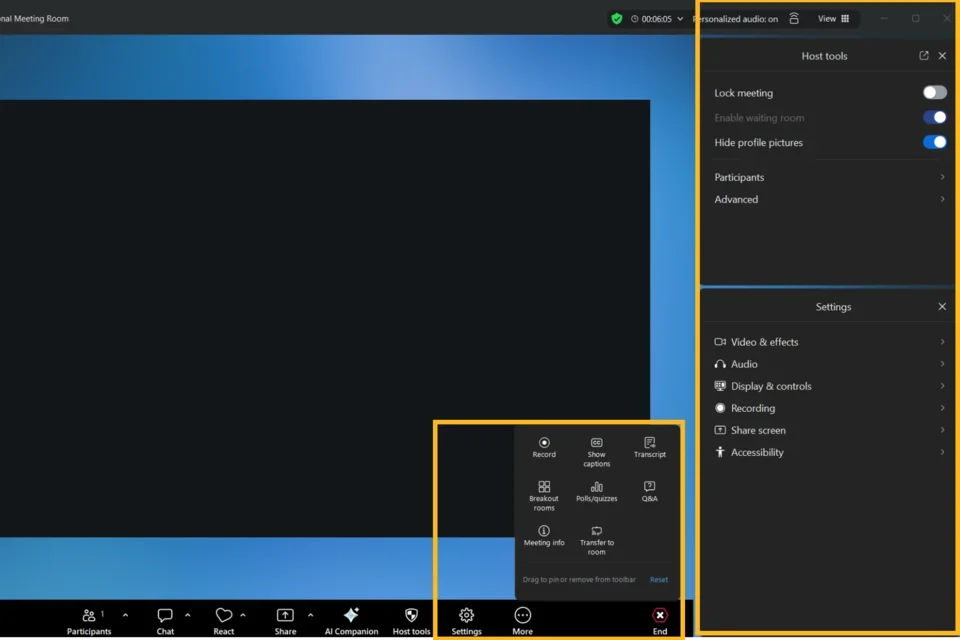
- Customizable in-meeting/webinar toolbar: The toolbar now displays only a few essential controls to create a more focused experience. You can customize which tools appear in the toolbar by selecting More, then right-clicking or dragging and dropping the tools you want to pin.
- If you use a tool that is not currently pinned, it will temporarily appear in the toolbar. To keep it permanently visible, right-click the tool and select Pin to Toolbar.
- More accessible settings and host tools: All meeting settings and host tools are now organized in a right-side panel, accessible through the Settings and Host Tools buttons in the toolbar.
Some toolbar buttons also include a caret (^) menu, allowing you to access additional settings specific to that tool directly from the toolbar. - Updated meeting header: The header on the left side of the meeting window now displays the meeting or webinar name along with a drop-down menu that provides quick access to session details.